Amadeus includes automated direction, Show Arc and 3D rig planning in its free core app. Here is how the alternatives charge—and what those prices cover.
FREE CORE APP
Amadeus DMX
$0software licence
No core subscription
Automated lighting + Show Arc
3D rig editor and preview included
Offline rules without AI usage fees
Compatible computer and DMX hardware required. Optional cloud AI usage is charged separately.
USD list prices checked 19 October 2026. These are alternative purchase options, not amounts to add together. Taxes, shipping, local pricing, promotions, hardware and optional services can change the total. Check the linked provider pages before buying.
THE AMADEUS ADVANTAGE
Already have a compatible computer and DMX interface? Your core Amadeus software cost is $0, including automated lighting and 3D preview. Keep cloud AI optional by choosing offline rules.
WHY CHOOSE AMADEUS?
A director for your whole night.
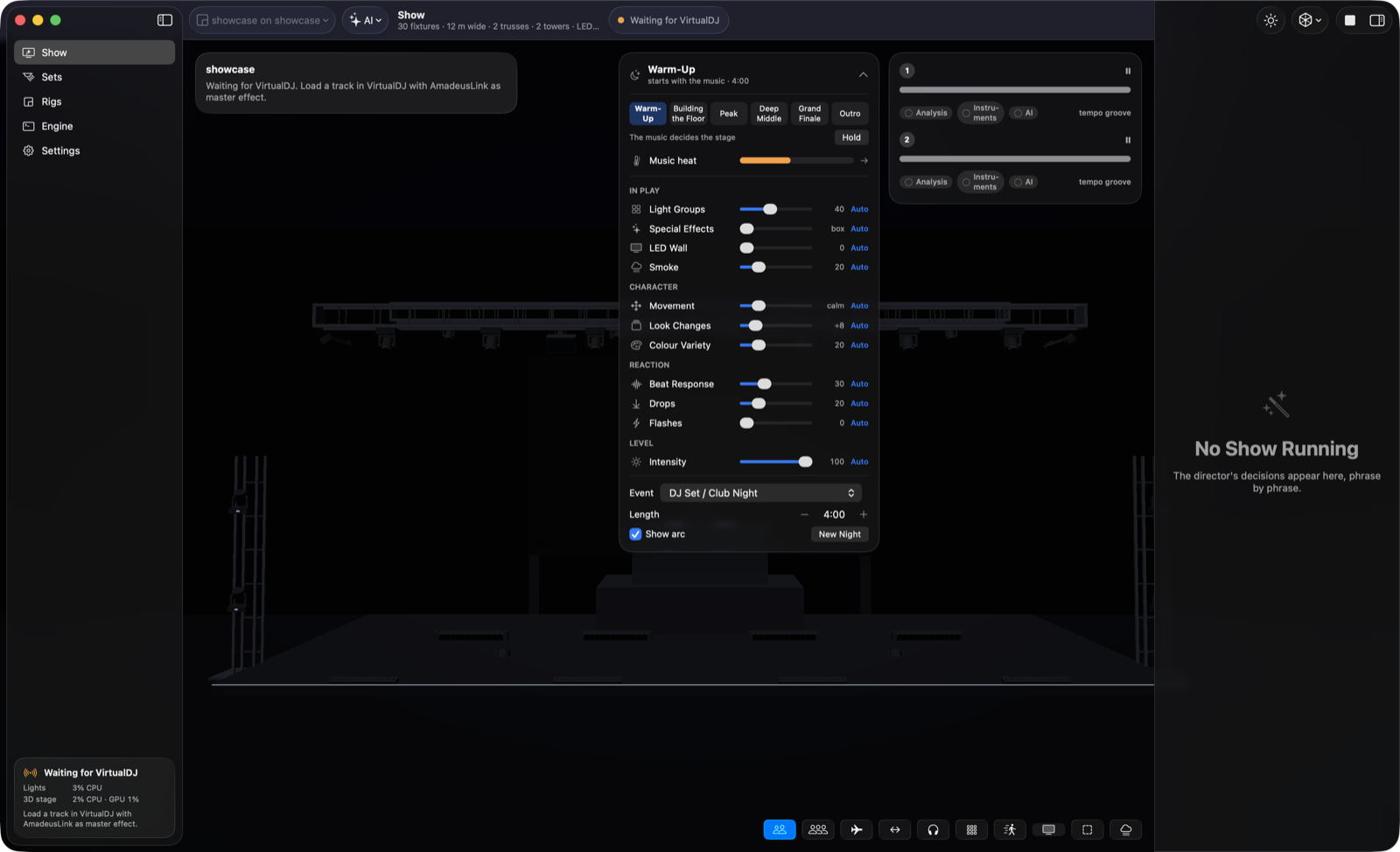
Set up your fixtures, choose a venue and let Amadeus follow your music. Show Arc gives the evening its own progression: a gentle start, a fuller dance floor, room to breathe and a finale.
You choose how much to automate. Use AI for creative decisions or offline rules for a self-contained setup. Preview the result in 3D before you connect the lights.
Set the event. Follow the music. Take over a control whenever you want.
01 / A FLEXIBLE APP OR A DEDICATED BOX
Amadeus DMX vs MaestroDMX
MaestroDMX suits performers who want a dedicated device listening to the audio feed. Amadeus puts track-aware direction, venue planning and 3D preview together on your computer.
THE AMADEUS ADVANTAGE
Put your existing compatible laptop to work. Build and preview your rig, connect your DJ software and shape the whole evening with Show Arc—without buying a dedicated autonomous lighting controller.
On smaller screens, swipe the table to compare both products →
Amadeus DMX vs MaestroDMX: feature comparison
What matters at your gig
Amadeus DMX
MaestroDMX
What you install
Mac or Windows app on a compatible computer you already own; a compatible DMX interface or network node connects your lights.
Dedicated hardware that runs the lighting show, configured through a browser. No show laptop required.Source ↗
How music drives the lights
Analyses available tracks for beats and phrases, then generates lighting that follows playback.
Listens to an incoming audio signal and makes lighting decisions as the music plays; no track pre-analysis.Source ↗
DJ software connection
VirtualDJ, djay Pro and Mixxx connections provide track and playback information. Amadeus Link supports a separate DJ laptop.
Audio-input workflow works independently of the DJ application; RCA input or a USB audio interface.Source ↗
Plan the venue
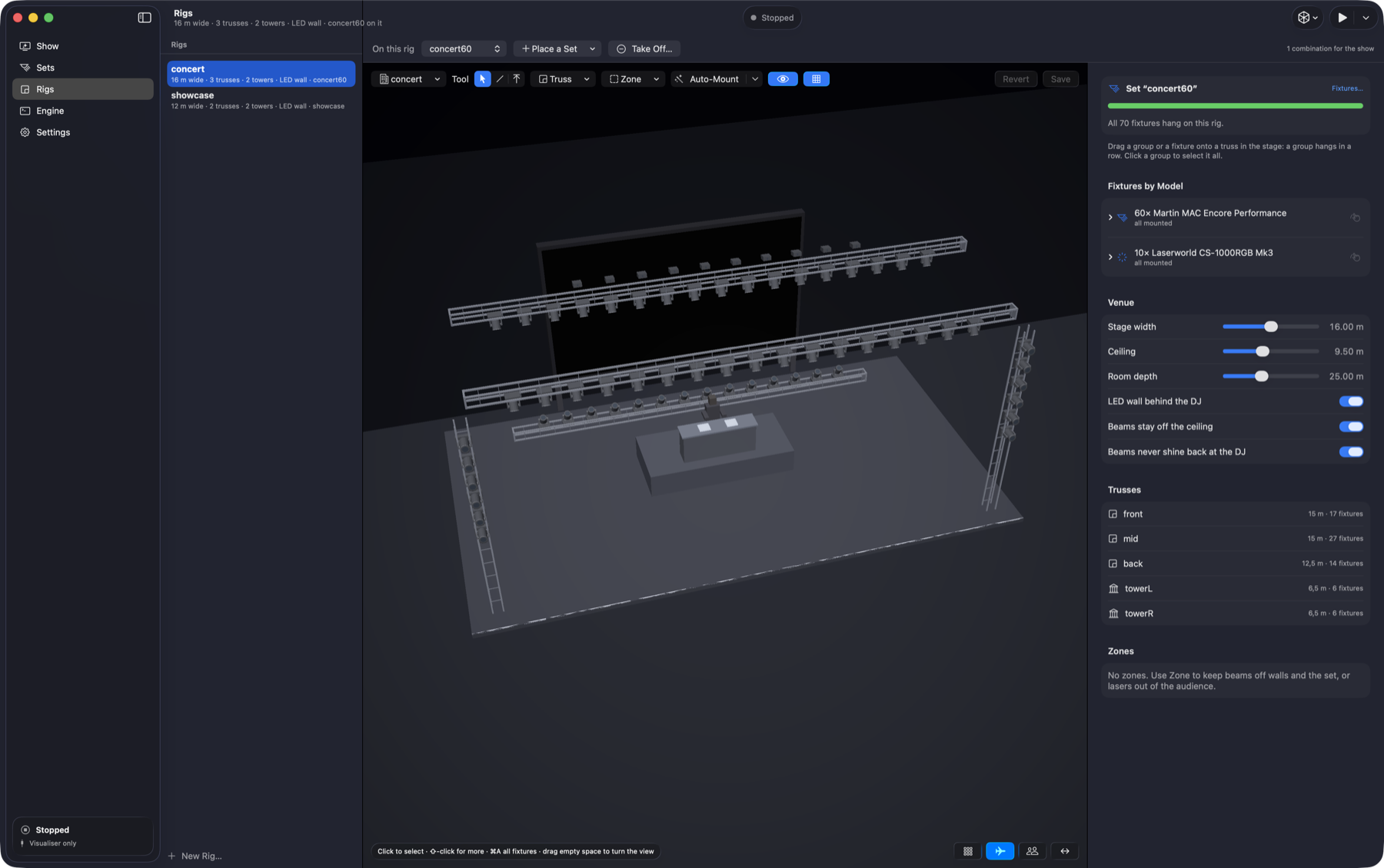
Built-in 3D rig editor and stage preview. Reuse your fixture set across venue layouts.
Fixture layouts in a line or 2D grid; save stages and fixture profiles. An integrated 3D preview is not listed in the cited core features.Source ↗
Shape the evening
Show Arc follows the night’s energy and event type. Adjust light groups, movement, colour variety and intensity, or return them to Auto.
Customisable patterns, palettes, cues, show playlists and static looks.Source ↗
Lighting connections
Art-Net, sACN and supported USB DMX interfaces, with universe routing.
The published specification lists one universe of DMX and one universe of Art-Net.Source ↗
Hands-on control
Override Show Arc controls and use Perform Only to focus on the physical lights.
MIDI and OSC control, plus manual fog/haze, blackout, strobe and brightness controls.Source ↗
Cost to get started
Core app and 3D preview are free. Your computer, DMX hardware and optional cloud AI usage are separate costs.
The MaestroDMX unit is listed at $899 USD. This buys dedicated hardware; check regional pricing, taxes and shipping.Source ↗
Which fits your setup?
Choose Amadeus if you want an integrated planning and DJ-lighting workflow on your laptop. MaestroDMX is worth considering when running without a show computer and responding directly to live audio are your priorities. Source ↗
SoundSwitch is a capable option for scripted shows and performance controls, with automation built in. Amadeus focuses on choosing looks for you, a built-in stage preview and direct workflows for djay Pro, Mixxx and VirtualDJ.
THE AMADEUS ADVANTAGE
For djay Pro and Mixxx users, Amadeus brings the DJ connection, phrase-level direction and 3D venue view into one free core app. Show Arc adds an event-wide layer above each individual track.
On smaller screens, swipe the table to compare both products →
Amadeus DMX vs SoundSwitch: feature comparison
What matters at your gig
Amadeus DMX
SoundSwitch
Build the show
Choose a cloud AI director, local model or offline rules. Amadeus makes phrase-level lighting decisions from track analysis.
AutoScripting generates shows with phrase detection; custom scripts and beat-synchronised Autoloops offer editable automation.Source ↗
Direct DJ integrations
VirtualDJ, djay Pro and Mixxx. Choose Amadeus Link when the DJ and lights run on separate computers.
Direct support includes Serato DJ Pro, VirtualDJ and rekordbox; Engine DJ is also part of its ecosystem.Source ↗
djay Pro workflow
Reads deck information and combines it with Ableton Link timing. On Mac, Accessibility permission is required.
djay Pro uses BPM detection or Ableton Link for Autoloops; its compatibility table does not offer scripted tracks or fader mixing for djay.Source ↗
See your rig in 3D
Stage preview and rig editor are built into the core app. Build a venue before connecting your physical lights.
Documents Art-Net connections to third-party 3D visualizers.Source ↗
The whole evening
Show Arc uses the event type, night length and musical energy to shape the show across tracks, with live overrides.
Track scripts, Autoloops, static looks and live FX provide the building blocks for your performance.Source ↗
Streamed music
Optional support for Spotify tracks played in djay Pro or VirtualDJ. Needs the streamed-track pack, internet and preparation; matching is not guaranteed.
Supports streaming through compatible DJ platforms. Its streaming guide specifies Autoloops rather than AutoScripts for streaming tracks.Source ↗
Manual performance
Take over the director’s live controls while the engine keeps following the music.
MIDI-triggered live overrides and custom lighting scripts suit DJs who want to design and perform detailed looks.Source ↗
Software cost
No core software subscription. Use offline rules without cloud AI charges; optional cloud AI is billed separately.
$7.99/month, $79.99/year or $199.99 for a 2.x perpetual software licence (USD). Hardware is separate.Source ↗
Which fits your setup?
Choose Amadeus for its supported DJ connections, built-in 3D tools and whole-night direction. SoundSwitch may be a better fit if your setup depends on Serato, rekordbox, Engine DJ or detailed scripted performance. Those are not released direct integrations in Amadeus. Source ↗
The 3D editor is part of Amadeus’s core experience. Keep a set of fixtures, place it in a venue and preview how the lighting moves before the first guest arrives.
DMXDesktop combines automatic DJ lighting with substantial programming and production tools. It also has a built-in 3D visualizer. Amadeus’s case is the combination of free core automation, director choice and Show Arc—not a claim that other apps cannot automate.
THE AMADEUS ADVANTAGE
Start with automated lighting and 3D planning without a paid software tier. Add djay Pro or Mixxx, choose your director, and let Show Arc follow the energy of the evening.
On smaller screens, swipe the table to compare both products →
Amadeus DMX vs DMXDesktop: feature comparison
What matters at your gig
Amadeus DMX
DMXDesktop
Automatic shows
Track analysis and a choice of director produce phrase-aware lighting. No manual per-song cue programming is required to get started.
DJ Mode analyses tracks; Konductor assigns fixture-group roles and varies the show within a track.Source ↗
Music sources
Local files, VirtualDJ, djay Pro and Mixxx, plus optional streamed-track support.
DJ Mode lists VirtualDJ, Traktor Pro 3/4 and a built-in two-deck player.Source ↗
Live audio without track files
Designed around tracks and supported DJ playback data. It is not presented as a live-band or arbitrary-audio listening system.
Live Wire reacts to live audio, including bands, vinyl and guest DJs, without prepared track files.Source ↗
3D planning
The core app includes the stage visualiser, rig editor and reusable fixture sets.
Integrated 3D stage and fixture visualisation are available; consult current plan and add-on options.Source ↗
Automation across the night
Show Arc responds to musical energy across the event, with event type, length, stage and live control settings.
Konductor organises roles and dynamics within tracks. Live Wire offers a separate real-time audio workflow.Source ↗
Control approach
Choose cloud AI, a local model or offline rules according to your setup.
DJ Mode, Konductor, Live Wire and timeline editing provide several automated and programmed approaches.Source ↗
Output and production tools
Art-Net, sACN and supported USB DMX; rig planning and a focused DJ lighting workflow.
Art-Net, sACN and USB DMX, with theatre-style cue stacks, palettes and additional routing features depending on plan.Source ↗
Free versus paid features
Core automated lighting and the 3D preview are free; cloud AI and physical equipment have separate costs.
Free: 64 channels, no DJ Mode or Live Wire. Standard: $10/month, $109.99/year or $179 once. Pro: $20/month, $220/year or $349 once (USD). One-time licences cover the current major version.Source ↗
Which fits your setup?
Choose Amadeus for a focused, free-core DJ workflow and event-wide Show Arc controls. DMXDesktop deserves consideration for Traktor, live-band audio through Live Wire, or theatre-style cue programming. Source ↗Source ↗
The core app, rig editor and 3D preview are free. You still need a compatible computer and a DMX interface or network node to run real lights. Cloud AI can incur provider charges; offline rules do not. Optional instrument-recognition models have non-commercial licensing restrictions. Read about optional features.
Do I need to program every track?
No. Amadeus analyses available tracks and generates lighting for them. Set up your fixtures and rig, choose a director and give tracks time to prepare. Supported DJ integrations follow playback; optional streamed tracks need extra setup and cannot always be matched. Follow the first-show guide.
Does it run on Windows as well as Mac?
Yes. Mac requires Apple Silicon and macOS 26 or later; Windows requires an x64 PC with Windows 10 22H2 or Windows 11. Windows DJ integrations are built but have not yet been verified on Windows hardware. Test your exact setup before a gig. Check full system requirements.
Can I keep using my DMX hardware?
Amadeus supports Art-Net, sACN and supported USB DMX interfaces. Check your interface model and fixture modes before switching. Existing show files from competing products are not advertised as importable. Check connection options.
Can I try the show without connecting lights?
Yes. Use Visualise Only to see a local track drive the 3D stage. It is a practical way to explore your rig before sending DMX output. Explore the stage preview.
About this comparison
Published by Amadeus DMX. Features checked on 19 October 2026 against our current user guide and the official product pages linked in each table. This is a comparison of documented capabilities, not a controlled performance test. An unlisted feature is not proof that a competitor cannot do it. Plans, availability and compatibility can change.
Amadeus is in beta. Windows integration verification and optional feature requirements are described in the guide. Physical output for higher-risk effects is restricted in the current beta; do not use the stage preview as a promise of live laser, strobe or blinder output. Read the current output limits. Competitor names belong to their respective owners; no affiliation is implied.
LET THE MUSIC LEAD
Make your next set a whole light show.
Download Amadeus DMX, build your rig and see what your music can do.